
|

|
Email: How do i change the default email address, that I send emails from?
In order to change the default email address - just follow the simple steps listed below. This guide assumes that you are using Outlook Express.
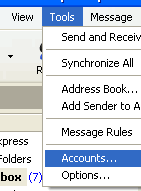
First of all, you will need to be in the Outlook Express program. You will need to go to the 'Accounts' menu option - which can be found in the 'Tools' menu;
From the 'Internet Accounts' window that opens up - select which email account from the list you would like to make the default email account instead. Once you have done this - you will need to press the button called 'Set as Default'.
Once you have done this - just press the 'Close' button
Go 'back' to the page you were viewing
|
|

Pay as you go
No monthly charges. Access for the price of a phone call
Go>
Unmetered
Flat rate dialup access from only £4.99 a month Go>
Broadband
Surf faster from just £13.99 a month Go> |
Save Even More
Combine your phone and internet, and save on your phone calls
More Info> |
This weeks hot offer
 24: Series 5
In association with Amazon.co.uk £26.97 |
|




