
|

|
Email: How do I use an existing email address with your service?
In order to use an existing email address - from an old internet provider - just follow the simple steps listed below. Basically, we will be showing you how to alter your emails outgoing email server - this is a simple process, and we will guide you through this. This guide assumes that you are using Outlook Express.
First of all, you will need to be in the Outlook Express program. You will need to go to the 'Accounts' menu option - which can be found in the 'Tools' menu;
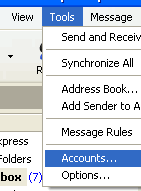
From the 'Internet Accounts' window that opens up - select the existing email address that you want to use with our service, and press the 'Properties' button, which can be found to the right of the window.
Another new window will now open up - you will need to click on the tab entitled 'Servers' - this is circled in the below image;
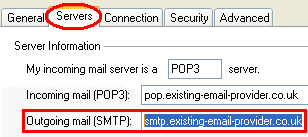
What you need to manually edit, is the outgoing mail smtp server - which is highlighted above by the red box. Delete everything that is in this field, and replace it with smtp.speed-mail.co.uk
Press the 'Apply' button, followed by the 'Close' button - until you return back to the main Outlook Express window. Try sending a test email to yourself, using the email address you just changed - this should successfully get sent
Go 'back' to the page you were viewing
|
|

Pay as you go
No monthly charges. Access for the price of a phone call
Go>
Unmetered
Flat rate dialup access from only £4.99 a month Go>
Broadband
Surf faster from just £13.99 a month Go> |
Save Even More
Combine your phone and internet, and save on your phone calls
More Info> |
This weeks hot offer
 24: Series 5
In association with Amazon.co.uk £26.97 |
|




