
|

|
Email: How do I open a file attached to an email?
Sometimes somebody may send you email messages with a file attached to them. This guide tells you how to open up the attachments using Outlook Express.
A warning about attachments
Viruses, worms and Trojan horses - that can damage your computer - can be sent to you, via email in the form as an attachment. This can happen when you receive an attachment from someone you don't know, when a friend's computer is infected with a virus that tries to copy itself to other computers via email, or even if a virus has spoofed a friend's email address.
The only way to find out whether an attachment is harmful is to check it using an anti virus program installed on your computer. If you don't have an anti virus program, think twice before opening any attachments that you weren’t expecting, or attachments that come from friends but have strange names. In particular, be very wary of opening any files with an .exe extension
The first thing you have to notice when dealing with a received attachment - is knowing if an email has an attachment, and how to open them up. You will know when a message has an attachment, because a picture of a paperclip appears to the left of each email in your inbox, and in the main viewing area of the email, to the right - as shown below (circled in red);
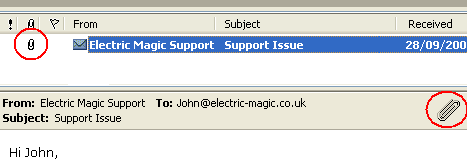
To open up an attachment - you can either single click on the large paper clip (as shown above on the right) - which will bring down a menu. From this menu you can select which files to open up, or to save all the files to a folder on your computer
Alternatively, you can double click on the highlighted email- which will open up in a new window. Then from there - next to where it says 'Attach:' the name of the files attached to the email are listed.
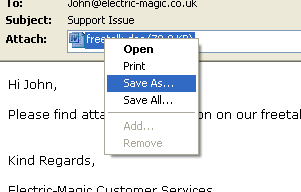
To open up the attachment, right click on each file, and press 'Open' - or - if you wish to save the file, click on the 'Save As' option (as highlighted above).
If you choose to open the attachment - it will open up in the default program - for example, images may open in Paint, whilst sounds open up in Media Player
Go 'back' to the page you were viewing
|
|

Pay as you go
No monthly charges. Access for the price of a phone call
Go>
Unmetered
Flat rate dialup access from only £4.99 a month Go>
Broadband
Surf faster from just £13.99 a month Go> |
Save Even More
Combine your phone and internet, and save on your phone calls
More Info> |
This weeks hot offer
 24: Series 5
In association with Amazon.co.uk £26.97 |
|




