
|

|
Email: How do I send a file attached to an email?
If you want to send a fil to a friends or family - you will need to master the art of attaching files. This is a very easy, and simple process. You can attach practically any sort of file to an email, of almost any size.
Most email users tend to make an attachment limit somewhere in the region of 5 to 10 Mb - though we recommend that you shouldn't send attachments more than around 200 Kb in size - mainly due to the time it takes dialup users to send or receive the attached files.
This guide tells you how to send attachments using Outlook Express.
First of all, you need to create your email message - you can do this the normal way. When you are ready to attach a file - carry on reading.
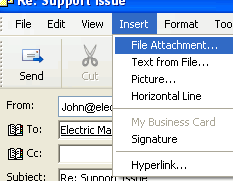
To attach a file - you will need to go to the 'Insert' menu - followed by clicking on 'File Attachment' (as demonstrated below);
You will then be displayed a browse file window - all you have to do here is search for the file you would like to attach to your email. You can attach multiple files from the same folder by holding down the 'Shift' key on your keyboard, and clicking on the file to be attached.
Once you have finished selecting the file(s) you wish to attach - press the 'Attach' button. Then the names of the attached files appear below the subject of your message. Remember: When you send the message, copies of the files are sent along with it. Your originals stay safe and sound on your computer - so you do not lose anything.
If you change your mind over any attached file - you can always delete it - by selecting it - then press the 'Delete' key on your keyboard.
Finally, once your email is ready to be sent - just press the 'Send' button - just like you would do with any other email
Go 'back' to the page you were viewing
|
|

Pay as you go
No monthly charges. Access for the price of a phone call
Go>
Unmetered
Flat rate dialup access from only £4.99 a month Go>
Broadband
Surf faster from just £13.99 a month Go> |
Save Even More
Combine your phone and internet, and save on your phone calls
More Info> |
This weeks hot offer
 24: Series 5
In association with Amazon.co.uk £26.97 |
|




