
|

|
Email: Why does my internet connection disconnect after checking my email?
The most likely cause of this problem, is that your email program has been told to 'hang up' once it has checked for new emails, or sent any emails - just follow the simple steps listed below to solve this problem. This guide assumes that you are using Outlook Express.
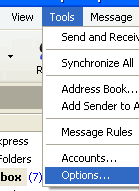
First of all, you will need to be in the Outlook Express program. You will need to go to the 'Options' menu option - which can be found in the 'Tools' menu;
Once the Options window opens up - you will need to select the 'Connection' tab - this is highlighted in the image below by the circle;
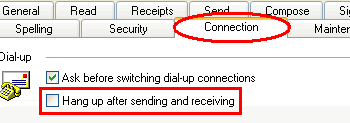
From the Connection tab, you will need to untick the box labelled 'Hang up after sending and receiving' - as shown in the above image.
Then just simply press the 'Apply' button
Go 'back' to the page you were viewing
|
|

Pay as you go
No monthly charges. Access for the price of a phone call
Go>
Unmetered
Flat rate dialup access from only £4.99 a month Go>
Broadband
Surf faster from just £13.99 a month Go> |
Save Even More
Combine your phone and internet, and save on your phone calls
More Info> |
This weeks hot offer
 24: Series 5
In association with Amazon.co.uk £26.97 |
|




