
|

|
My Account: How do I get a new email address?
To add a new email address to your account - you will need to be logged into your account - via the 'My Account' section (opens in a new window). Then just follow our step by step guide below;
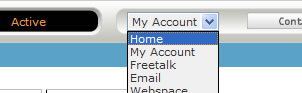
- Once logged in, by using the top menu, go down to the 'Email' choice, and click on the 'New Account' tab on the left hand menu of the control panel
- Enter in the details for your new email address
- Your new email address is now ready - and you can now set this new address up within your chosen email program. Please visit the email help section, in order to add this email address to your email program
Go 'back' to the page you were viewing
|
|

Pay as you go
No monthly charges. Access for the price of a phone call
Go>
Unmetered
Flat rate dialup access from only £4.99 a month Go>
Broadband
Surf faster from just £13.99 a month Go> |
Save Even More
Combine your phone and internet, and save on your phone calls
More Info> |
This weeks hot offer
 24: Series 5
In association with Amazon.co.uk £26.97 |
|




